Install Ibo Player Pro on Amazon Firestick – Complete Step-by-Step Guide (2026)
To install Ibo Player Pro on Amazon Firestick, enable Apps from Unknown Sources, install the Downloader app, enter Downloader code 481220 to sideload the official APK, click Install, then activate the app on iboproapp.com using your Device ID and Device Key. This 2026 tutorial walks you through every step needed to install Ibo Player Pro on your Amazon Firestick, Firestick 4K, Firestick 4K Max, or Fire TV Cube running Fire OS 6+, including pro tips and a backup sideloading method using Send Files to TV.
Are you in search of a professional M3U stream player that quickly loads your M3U playlist and plays your favorite channels without glitches? Meet Ibo Player Pro — an M3U stream player that works for Amazon Firestick, Android Smart TVs, Android sticks, smartphones, and tablets. With an advanced M3U engine, simple UI, and powerful playback controls, it is the smarter and easier way to enjoy TV shows, movies, sports, or anything you like, especially since Ibo Player Pro supports all screen resolutions including 4K Ultra HD.
Optimized for fast M3U streaming, Ibo Player Pro easily loads your M3U playlists on Firestick and lets you watch your content in the highest quality without the lags or usual glitches found in similar M3U apps. Whether you are a tech-savvy enthusiast or new to streaming sticks, this guide ensures a hassle-free installation in under 8 minutes.
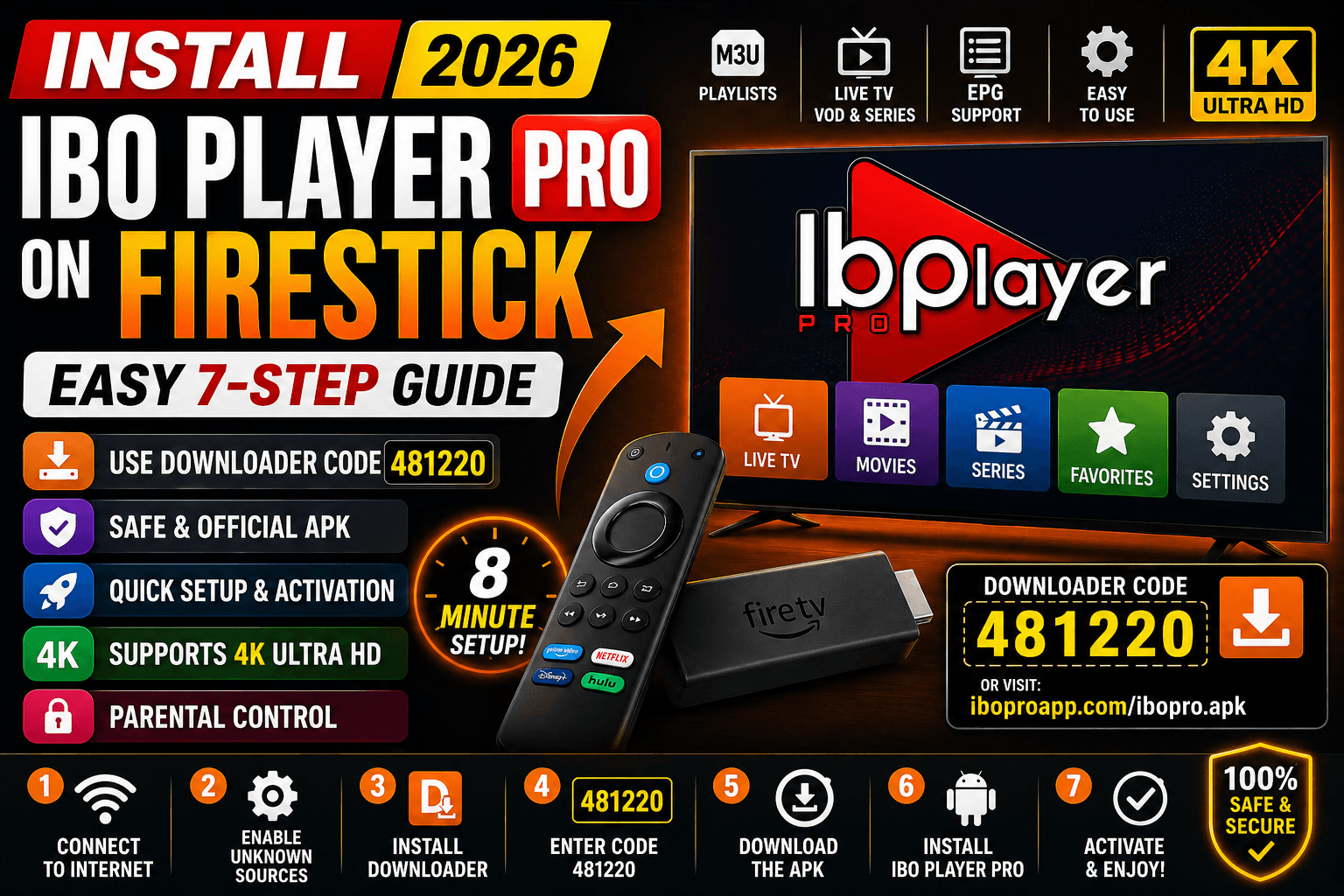
Table of Contents
What You Need Before Starting
Before you install Ibo Player Pro on Amazon Firestick, gather the following essentials. Having everything ready prevents the most common Firestick sideloading errors.
- An Amazon Firestick (any generation), Firestick 4K, Firestick 4K Max, or Fire TV Cube running Fire OS 6 or higher
- A stable internet connection (Ethernet adapter recommended for 4K streams)
- A registered Amazon account signed in on the device
- A valid M3U playlist URL or Xtream Codes credentials from your IPTV provider
- The Amazon Fire TV remote (voice remote works best for typing the URL)
- At least 200MB of free storage on your Firestick
- About 8 minutes of setup time
How to Install Ibo Player Pro on Amazon Firestick (7 Steps)
The fastest way to install Ibo Player Pro on Amazon Firestick is by sideloading the official APK with the Downloader app using code 481220. Follow these seven steps in order — the entire process takes under 8 minutes.
- Prepare your Firestick. Power on your Amazon Firestick and make sure it is connected to the internet via Wi-Fi or an Ethernet adapter. From the home screen, navigate to Settings at the top right.
Pro tip: Restart your Firestick before sideloading to free up RAM — this prevents install hangs on older 1st-gen Firesticks. - Enable Apps from Unknown Sources. Go to Settings → My Fire TV → Developer options → Install unknown apps (or “Apps from Unknown Sources” on older Fire OS). Toggle it on for the Downloader app.
Pro tip: If Developer options is missing, return to About and click on the Fire TV name 7 times to unlock it. - Install the Downloader app. Return home, click the search icon, type Downloader, and install the orange app by AFTVnews. Open it and accept all permission prompts.
Pro tip: Pin Downloader to your home screen — you will reuse it for future updates of the Ibo Player Pro APK. - Open the Downloader URL field. In the Downloader app, click the URL bar in the Home tab. The Firestick voice remote will let you dictate the next step instead of typing.
- Enter the official Downloader code. Type the code 481220 (this is the official Ibo Player Pro Downloader code) or paste the direct URL https://iboproapp.com/ibopro.apk. Press Go. The Ibo Player Pro APK starts downloading immediately — usually under 30 seconds.
- Install Ibo Player Pro. Once the download completes, click Install on the prompt that appears. Wait for the “App installed” confirmation, then click Done. Important: click Delete on the next prompt to remove the APK file and free up storage — the app is already installed and will not be affected.
- Launch and activate Ibo Player Pro. Go to Your Apps & Channels → See All, scroll to Ibo Player Pro, open it, then note your Device ID and Device Key. Visit iboproapp.com on a phone or PC, register, upload your M3U playlist, complete the small activation fee, and restart the app.
That is it — your Firestick is now ready to stream. If the Downloader code does not work, use the alternative method below.
What If the Downloader Method Fails on Firestick?
If you cannot use Downloader because of regional restrictions or a network block, two reliable alternatives let you sideload Ibo Player Pro on Firestick. Both methods are documented as information not provided on the official Ibo Player Pro website.
Method A: Send Files to TV (Wireless Sideloading)
This method pushes the APK from your phone or PC to your Firestick over Wi-Fi.
- Install Send Files to TV from the Amazon App Store on your Firestick.
- Install the same Send Files to TV app on your Android phone or as a desktop application on your PC.
- Download the official Ibo Player Pro APK from iboproapp.com/ibopro.apk to your phone or PC.
- Connect both devices to the same Wi-Fi network and open Send Files to TV on each.
- From your phone or PC, select Send, choose your Firestick, and pick the APK file.
- On the Firestick, accept the incoming file. Open the APK with a file manager like ES File Explorer and click Install.
Method B: Aurora Store / APKMirror via File Manager
Power users can install a file manager such as X-plore File Manager from the Amazon App Store and load the APK from a USB OTG drive plugged into the Firestick. This is useful when both internet methods fail. Always verify the APK signature matches the official iboproapp.com release before installing.
How to Activate Ibo Player Pro on Firestick
Activation links your Firestick to your M3U playlist on the Ibo Player Pro server. Without activation, the app will not load any channels or VOD content.
- Open Ibo Player Pro on your Firestick. Note the Device ID (long alphanumeric string) and Device Key shown.
- On a phone or computer, visit iboproapp.com and click “Add Device”.
- Enter your Device ID and Device Key exactly as displayed (case-sensitive).
- Choose how to add your playlist: M3U URL, M3U file upload, or Xtream Codes credentials.
- Pay the one-time activation fee (approximately $5.99 per device).
- Return to your Firestick and restart Ibo Player Pro. Your channels and VOD will load automatically.
Pro Tips for Firestick Users
These five tips squeeze the best performance out of Ibo Player Pro on Amazon Fire OS.
- Tip 1: Use an Ethernet adapter for 4K streams. Wi-Fi packet retries cause buffering on heavy M3U playlists. The Amazon Ethernet Adapter eliminates the issue completely on Firestick 4K and Fire TV Cube.
- Tip 2: Restart your Firestick weekly. Go to Settings → My Fire TV → Restart. This clears cached memory and keeps Ibo Player Pro responsive on long streaming sessions.
- Tip 3: Disable App Background Data. Under Settings → Applications → Manage Installed Applications, force-stop apps you do not use to free RAM for Ibo Player Pro — especially helpful on the basic 1GB-RAM Firestick Lite.
- Tip 4: Pair Ibo Player Pro with a Mouse Toggle app. Some M3U providers use embedded web players that need a virtual cursor. Mouse Toggle for Fire TV solves this when a stream refuses to launch.
- Tip 5: Use a low-overhead VPN. If your ISP throttles streaming, choose a WireGuard-based provider; OpenVPN is heavier on Firestick CPUs and will cause buffering during 4K playback.
Troubleshooting Common Issues
If something goes wrong during install or activation, one of these five fixes resolves it almost every time.
Why Won’t the Ibo Player Pro APK Install on My Firestick?
The most common cause is that Apps from Unknown Sources is disabled. Re-enable it under Settings → My Fire TV → Developer options. Also check that you have at least 200MB of free storage and that the APK finished downloading completely in Downloader.
The Downloader Code 481220 Says “Could Not Retrieve File”
Your network DNS may be blocking the URL. Try Method A (Send Files to TV) above, or change the Firestick DNS by going to Settings → Network, holding the menu button on your network, and setting DNS to 1.1.1.1 (Cloudflare).
Ibo Player Pro Crashes Immediately on Launch
Force-stop the app via Settings → Applications → Manage Installed Applications → Ibo Player Pro → Clear cache. If the issue persists, uninstall and reinstall using the latest APK from iboproapp.com — old versions can clash with newer Fire OS updates.
Channels Don’t Load After Activation
Re-check your M3U URL on iboproapp.com. The most common error is using an expired playlist or pasting the URL with extra spaces. Restart the Ibo Player Pro app twice after fixing the playlist.
Why Is the Stream Buffering on Wi-Fi?
Firestick Wi-Fi can struggle with large M3U playlists. Switch to a 5GHz network, move the Firestick within line-of-sight of your router, or use the Amazon Ethernet Adapter for a wired connection — the most reliable fix for 4K buffering.
Ibo Player Pro vs Other M3U Players for Firestick
Here is how Ibo Player Pro compares against the most popular M3U player alternatives for Amazon Firestick in 2026.
| Feature | Ibo Player Pro | IPTV Smarters Pro | TiviMate |
|---|---|---|---|
| Install method on Firestick | Sideload via Downloader (481220) | Sideload via Downloader | Sideload via Downloader |
| Price | ~$5.99 one-time | Free | Free / $19.99 Premium |
| 4K Ultra HD support | Yes | Yes | Yes |
| EPG (TV Guide) | Yes | Yes | Yes (best in class) |
| Xtream Codes | Yes | Yes | Yes |
| Parental controls | Yes | Yes | Premium only |
| Multi-language audio & subtitles | Yes | Yes | Yes |
| Setup difficulty on Fire OS | Easy | Easy | Medium |
| Best for | 4K streaming with rich VOD metadata | Multi-platform users | Power users wanting top EPG |
Ibo Player Pro Feature Highlights
Ibo Player Pro is optimized for fast M3U streaming on Amazon Firestick. The player loads your playlists smoothly and lets you watch content in the highest quality without the lags or glitches common in other M3U apps.
- Easy streaming of M3U URLs and playlists
- Simple, intuitive UI designed for Fire TV remotes
- Supports all screen resolutions including 4K Ultra HD
- Movie and series details: release date, cast, trailer, and ratings
- Add channels, movies, and series to favorites
- Compatible with MX Player, VLC, and the built-in Fast Streaming engine
- Multi-language audio selection
- Subtitles in movies and series
- Built-in parental control
Frequently Asked Questions
What is the Downloader code for Ibo Player Pro on Firestick?
The official Downloader code for Ibo Player Pro on Amazon Firestick is 481220. Enter it in the Downloader app URL field to download the official APK directly from iboproapp.com.Is Ibo Player Pro available on the Amazon App Store?
Ibo Player Pro is not always available on the Amazon App Store. The recommended installation method on Firestick is sideloading the APK using the Downloader app with code 481220.How much does Ibo Player Pro cost on Firestick?
Ibo Player Pro requires a small one-time activation fee of approximately $5.99 per device on iboproapp.com. There are no monthly subscription fees from the player itself.Is sideloading Ibo Player Pro on Firestick safe?
Yes, sideloading is safe when you use the official Downloader code 481220 or download the APK directly from iboproapp.com. Never install APKs from unverified third-party sources.Does Ibo Player Pro support 4K streaming on Firestick?
Yes. Ibo Player Pro supports all screen resolutions including 4K Ultra HD on the Firestick 4K, Firestick 4K Max, and Fire TV Cube. Use Ethernet for the most stable 4K streaming.What is the Device ID and Device Key in Ibo Player Pro?
The Device ID and Device Key are unique identifiers shown when you first open Ibo Player Pro on your Firestick. You enter both on iboproapp.com to register and activate the app.Why won’t Ibo Player Pro install on my Firestick?
The most common cause is that Apps from Unknown Sources is disabled. Enable it in Settings → My Fire TV → Developer options, then retry the install. Also confirm you have at least 200MB free storage.Does Ibo Player Pro provide TV channels or content?
No. Ibo Player Pro is only a media player. It does not provide, sell, or supply any channels, movies, or content. Users must obtain legal M3U playlists from licensed providers.
Legal Disclaimer
Ibo Player Pro does not provide, sell, or supply any TV channels, movies, series, or content of any kind. It is strictly a media player that plays your own M3U lists. Users are solely responsible for using legal M3U playlists obtained from licensed providers and for complying with the broadcasting, streaming, and copyright laws applicable in their country or region. We do not host, distribute, or endorse any copyrighted content, and we are not affiliated with Amazon, Inc. or any IPTV service provider.
Conclusion
Choosing to install Ibo Player Pro on Amazon Firestick is the smart move for anyone who wants a clean M3U player with 4K support, rich VOD metadata, and a remote-friendly interface. With the seven-step Downloader method using code 481220 — or the Send Files to TV workaround for blocked networks — you can be streaming your M3U playlist in under 8 minutes.
Pair Ibo Player Pro with an Ethernet adapter, a clean M3U playlist from a reputable provider, and the latest Fire OS update, and you will have one of the smoothest IPTV experiences possible on Amazon Firestick in 2026.
Need more help? Browse our complete tutorials library, visit our help center, or read our privacy policy and terms of service.
Ready to start streaming?
- Visit Website: https://iboproapp.com/
- Ibo Player Pro for Android: Google Play
- Ibo Player Pro for iOS: App Store
- Amazon Fire TV Support: Amazon Support
- Official Downloader Code: 481220
Related tutorials
Need help? Browse all guides or chat with our team